Time simplified
WorkRippling · Time Standalone
Time simplified
Making enterprise-grade Time simple enough to be a small team’s first Rippling product
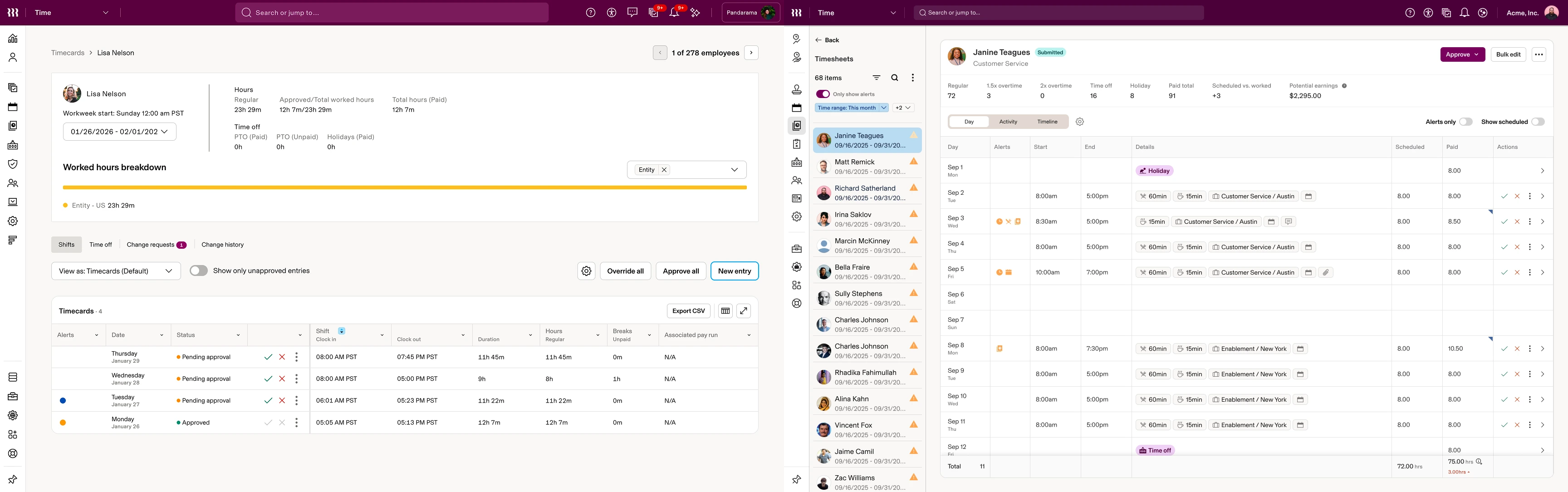 AfterBefore
Project snapshot
My contribution
Role
Lead designer for Time; design DRI for Time Settings V2 in 2026
With
1 of 2 Time designers; 2 PMs and 20+ engineers, plus a Timesheets team of five and a mobile team
Constraint
An assigned late-October 2025 launch target; the deeper systems work continued into 2026
Settings and packaging
I led Time Unification, then shaped the Settings rearchitecture: one configuration model, defaults and exceptions, progressive disclosure, and the capabilities exposed at each Time tier
Timesheets, web and mobile
I designed across Timesheets Home, the Timesheet Editor and Time Entry Details on web, and redesigned mobile Time Entry Details and Shift Details with a separate mobile team
Code and support
I authored 12 production frontend PRs for Time Entry Details, and supported onboarding, the Time overview, Policies and Job Dimensions
Project details
- Company
- Rippling
- Product area
- Scheduling · Time & Attendance · Time Off
- Discipline
- Product design · Systems design · Web + mobile
- Timeline
- Summer 2025 → 2026
- Status
- Time Standalone launched; Timesheets rolled out to every customer; mobile details shipped; Time Settings V2 in progress
- Timesheets scale
- 300k+ daily users across the broader Time customer base
- Strategy
- Top of funnel expansion the intent: Time as a way into Rippling
- Estimated added cross-sell ARR
- ≈$10M · broader WIW initiative, Oct 2026
00 Overview
What happens when a powerful workforce product, built inside a much larger platform, has to compete with one a small business can start using with a name and an email?
That was the question behind Time Standalone: make Time work as a customer’s first Rippling product, and simple enough for a When I WorkWhen I WorkA scheduling and time-tracking app built for small businesses, known for how little setup it takes. Rippling acquired it, and with it a steady flow of free signups and an established customer base. Those customers would move onto Rippling’s Time, so When I Work set the bar for how simple Time had to feel. customer to understand. I worked across the configuration model, Timesheets on web, the matching mobile details and, for one drawer, the production frontend.
01 Why Time stood alone
A new front door into Rippling
Rippling usually met small businesses through Payroll and HRIS, and few replace payroll often. Scheduling and time tracking they switch more readily, and When I Work showed how little setup that could take.
Strategic intent
- A small business needs time softwareScheduling, time tracking, time off; switched more readily than payroll
- Also arriving at this step: When I Work’s customersStarts with Time StandaloneQuick signup, no Payroll required
- Rippling earns trustProves value on a tool used every day
Rippling’s acquisition of When I Work brought that low-friction product, a steady flow of free signups and an established customer base whose expectations were shaped by its simplicity. As the standalone workstream began in August 2025, the product experience and the go-to-market processes were being built in parallel.
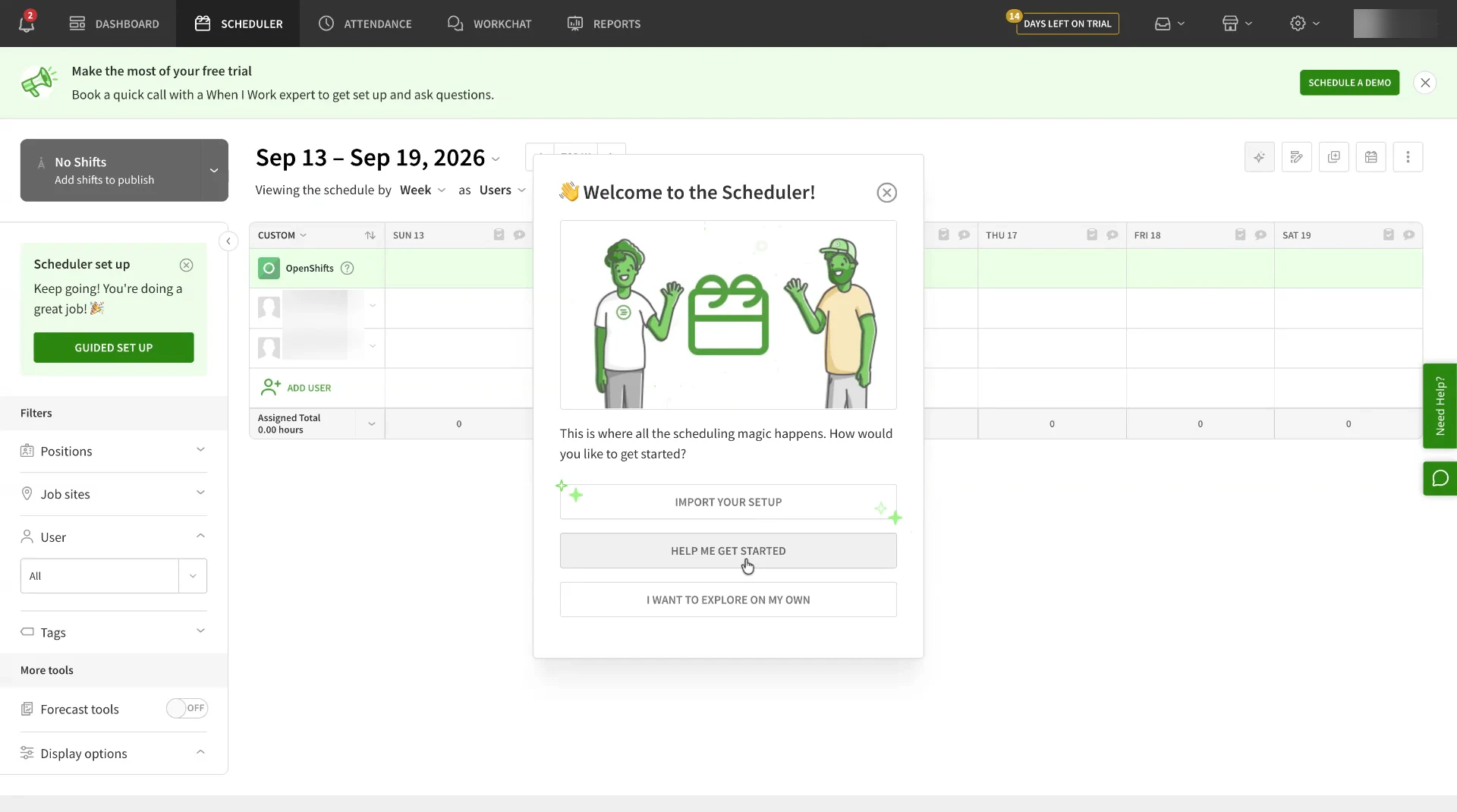
02 The simplicity gap
When I Work made the simple case simple. Rippling made the hard cases possible.
The same intent, running a team, sat on very different foundations
- Sign up · name + email
- Add team members · name + email
- Set a few basic rules
- Build a schedule
- Invite the team
- Track time
- Legal entities
- Employees
- Employment data
- Work locations
- Countries
- Roles
- Departments
- Managers
- Permissions
- Approval chains
- Pay rates
- Piece rates
- Job codes
- Job dimensions
- Schedules
- Policies
- Pay periods
- Overtime rules
- Break rules
- Leave accrual rules
- Compliance
- Payroll relationships
- Feature entitlements
- Org data
Parity, not a clone
Migrating customers needed the workflows they already depended on, from building a schedule to approving hours, now running on Rippling’s architecture. The question became how to keep that power underneath while the default felt close to what they knew.
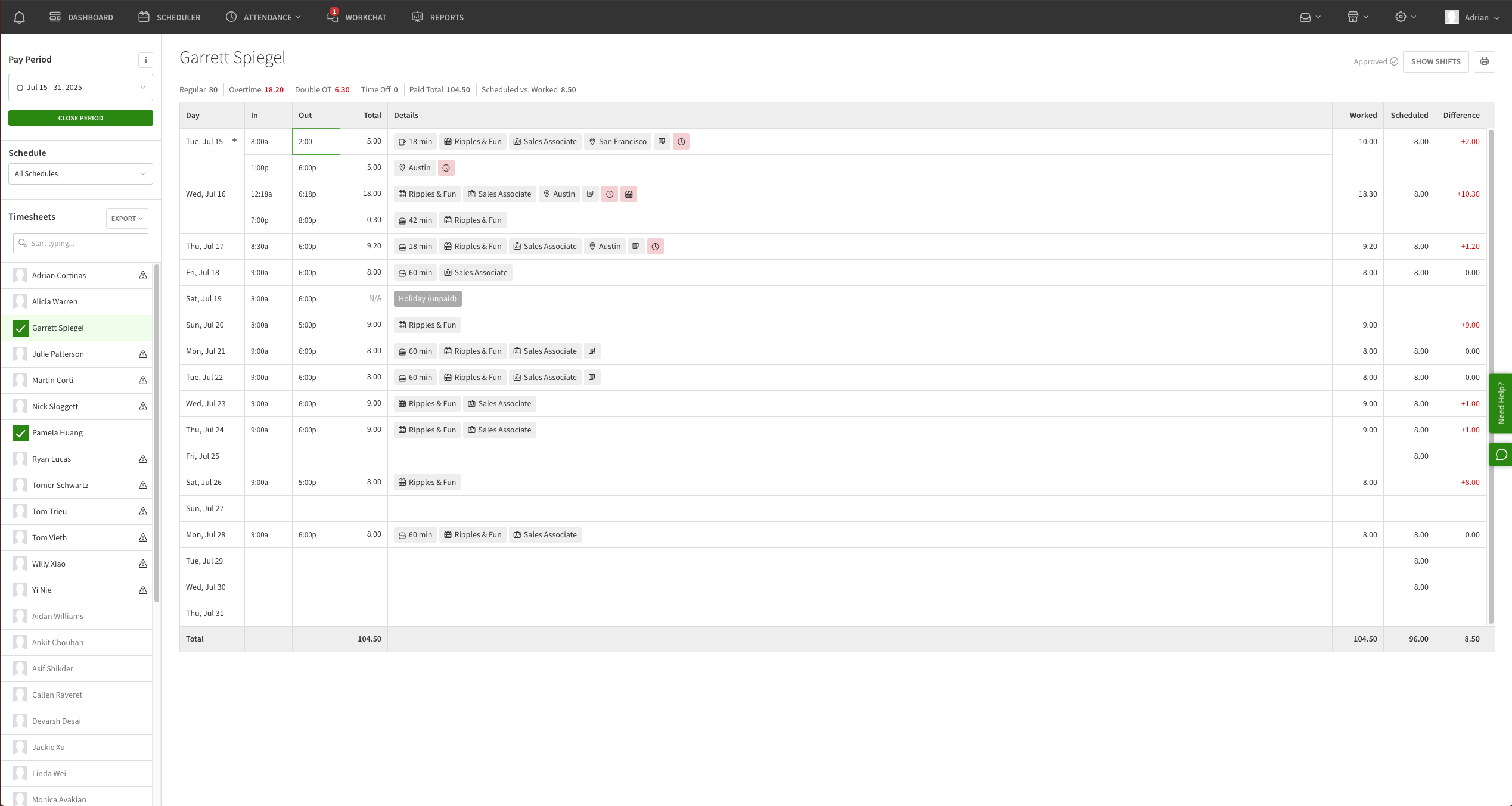
When I Work’s timesheet: one employee’s pay period, day by day, scheduled against worked
Showing image 01 / 05
04 The constraint
Ninety days was the target. The system took longer.
The team was assigned a late-October 2025 launch date and raised feasibility concerns about the scope. We had to define a coherent first version under it.
- Standalone work begins
- TargetAssigned launch deadlineWe raised feasibility concerns
- The system took longerEnd-to-end testing still finding system boundaries
- First When I Work migrations reported
- Rollout and parity; Timesheets live for everyone
- Continued work
- Time Settings V2
- Timesheets evolution
- Mobile details
- Implementation quality
- AI explanations
05 Design thesis
Simple by default. Capable underneath.
The principle that connected the strategy to the screens
- DefaultThe ordinary customer succeedsOne set of rules that applies to everyone
- Only when neededExceptionA specific need differsOne group, schedule or location set differently
- Only when neededAdvancedDeeper control is thereRanked policies, compliance rules, custom pay
06 Time Settings
Stop making customers learn our policy model
Time Unification, which I led and designed from late 2024 to Q1 2025, brought Scheduling, Time & Attendance and Time Off under one roof. Underneath, configuration still worked three different ways.
Step 06.1 Fragmented model
Admins learned the software, not their rules
After unification, the Policies section alone had eight tabs built on three different conceptual models
FIG. HEight tabs, three modelsCompliance straddled two features; General and Approval weren’t policies at all Policies, after unification · 8 tabs
Feature-specific policy rules
Each feature had its own policy engine
Every tab configured differently; no shared mental model
Cross-feature rules
Overtime, breaks, custom pay and state or local law
Straddled Scheduling and T&A: which feature owned overtime?
Not really policies
Work hours, weekends, holidays; approvals split between Timecards and Time Off
General was settings; Approval was workflow
Result
Admins learned the UI, not the system
A long-time Rippling admin could eventually learn where everything lived. A new standalone customer, especially one coming from When I Work, had almost no chance of finding it on their own.
FIG. IConfiguration in two places: Time Settings’ three tabs, each with its own sub-navigation, then eight Policies tabs 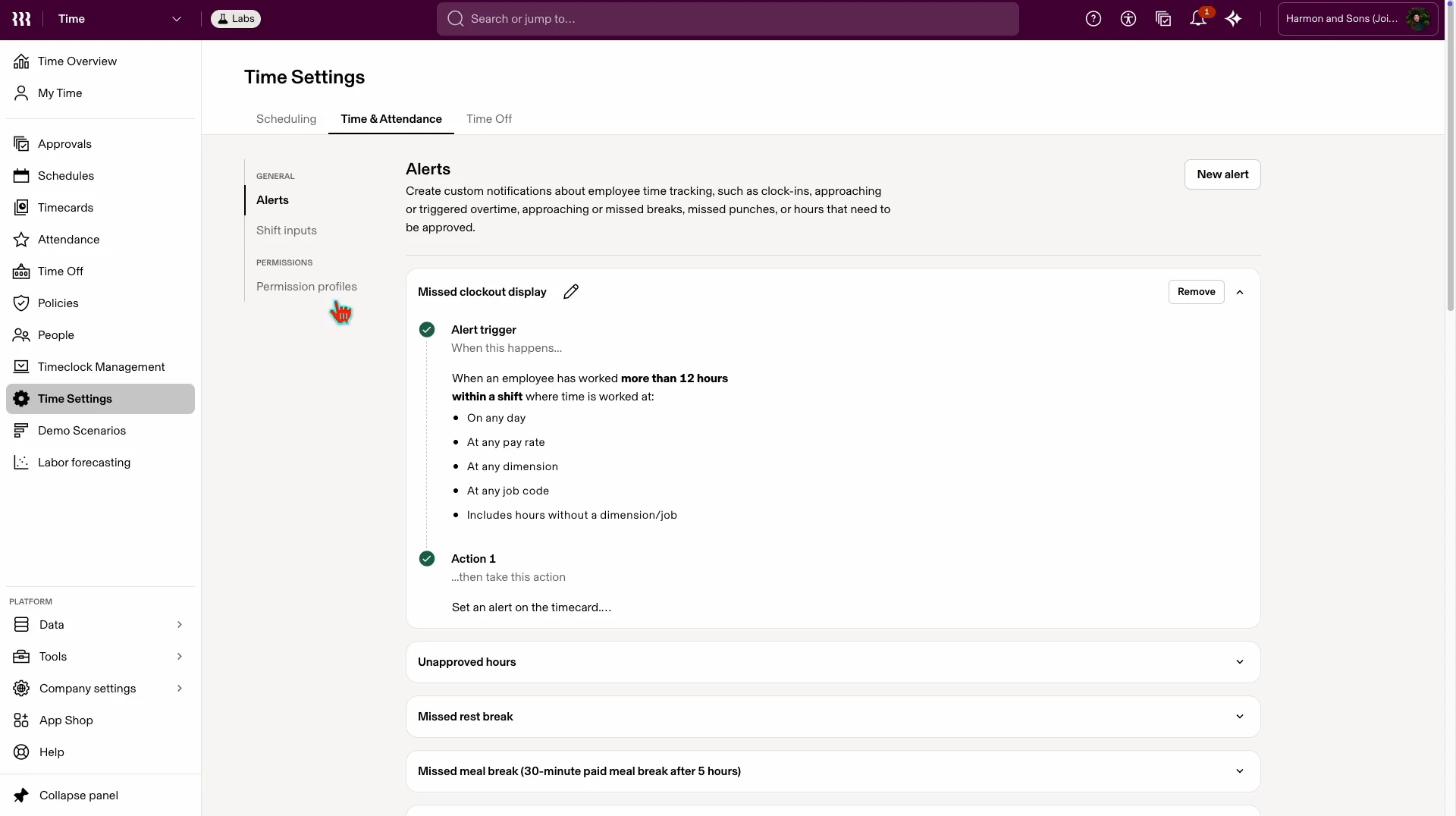
Configuration in two places: Time Settings’ three tabs, each with its own sub-navigation, then eight Policies tabs Step 06.2 Two models
Two mental models in one nav item
Time & Attendance and Time Off both lived in Policies but configured nothing alike, and neither offered a simple “just turn on overtime” path
FIG. JTime & Attendance and Time Off configuration, beforeThe challenge: coherence across both, without collapsing their real differences Time & Attendance, time tracking policies
A heavy wizard just to set a default
- Default time policy, Applies to everyone unless overridden
- Three-step setup wizard
- Details
- Permissions
- Approvers
- Custom policies per group, Assigned with Object Graph filters, e.g. Department = Product Design
Time Off, leave policies
Four layers and ranking just to give someone PTO
- Country layer, Policies scoped by jurisdiction
- Rippling default policies, Compliance minimums to copy and customize
- Custom policies, ranked, Priority order decides
- Employee-to-policy matching, Only the top-ranked policy applies
Same nav item: No shared patterns, no consistent language
FIG. KThe two models in the product, before: Time Settings in three tabs, Policies in eight 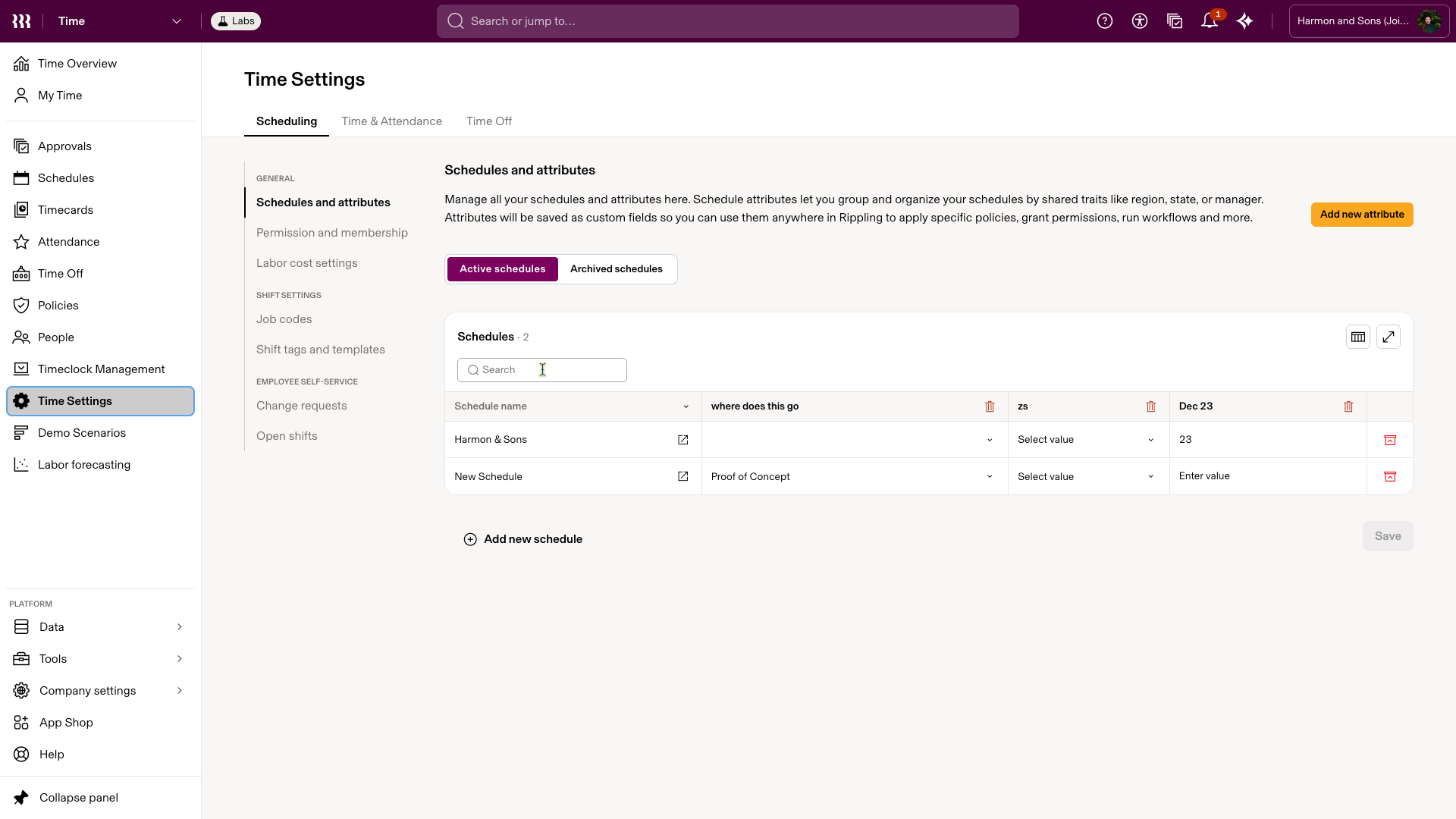
BeforeTime Settings, Scheduling: schedules and their attributes, with labor cost, job codes, shift tags and open shifts in the side menu
Showing image 01 / 11
Step 06.3 Settings simplification
One place to ask how Time should work
I pushed toward a single Time Settings, and we built it: the Policies tab went away, and a settings page with toggles and inputs replaced the setup wizard
FIG. LSettings and Policies, merged into one Time Settings Before
“Which policy object do I need?”
- Time Settings3 feature tabs
- Scheduling
- Time & Attendance
- Time Off
- Policies8 tabs, 3 different models
- Feature-specific policy rules
- Cross-feature rules
- Not really policies
After
“How should Time work for my team?”
Time Settings
Policies tab removed; one structure
- Scheduling
- Time & Attendance
- Time Off
- Permissions
FIG. MOne setting, before and after: time tracking configured through a policy’s setup wizard, then on one Time Settings page 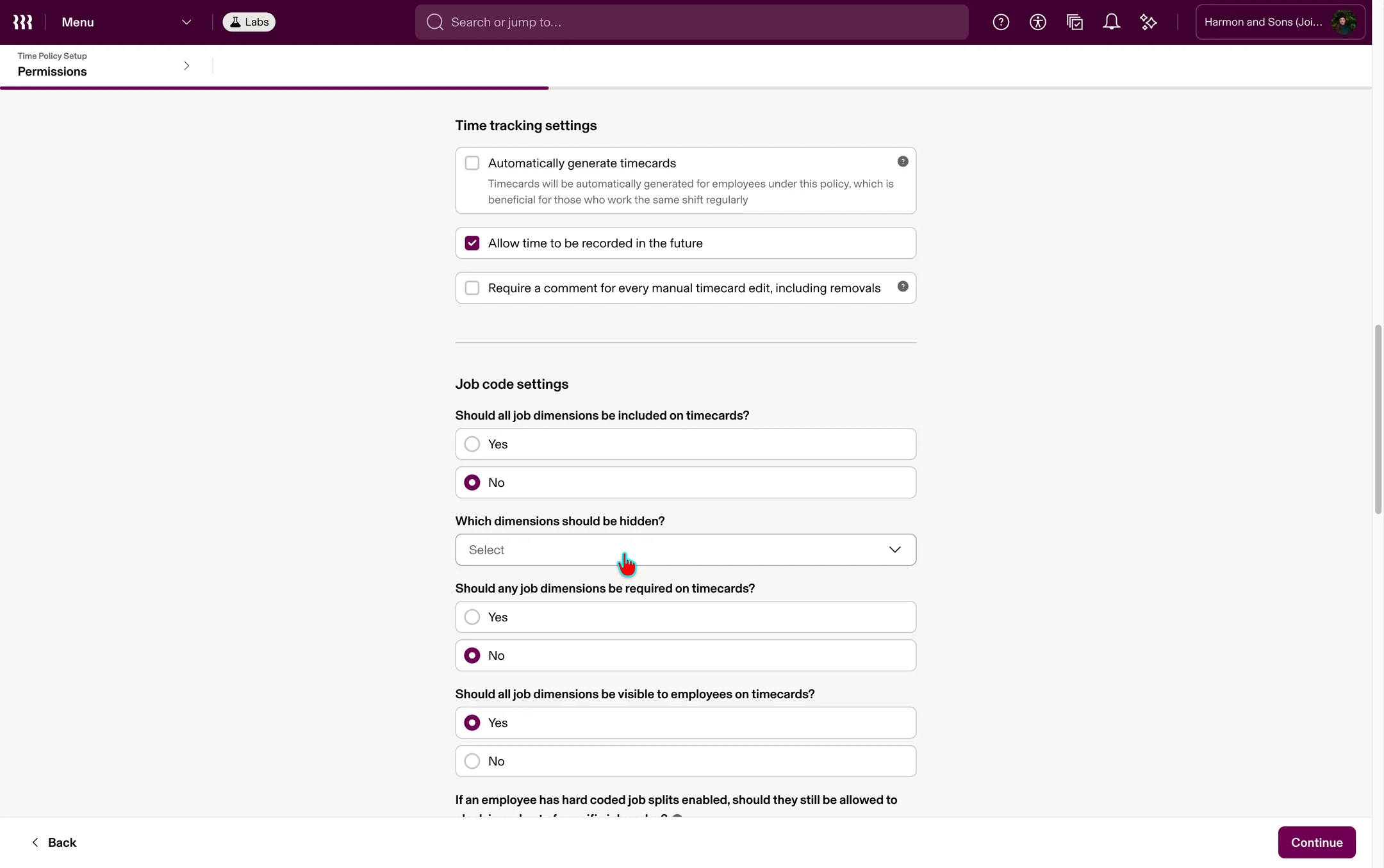
BeforeA time policy’s setup wizard, page by page 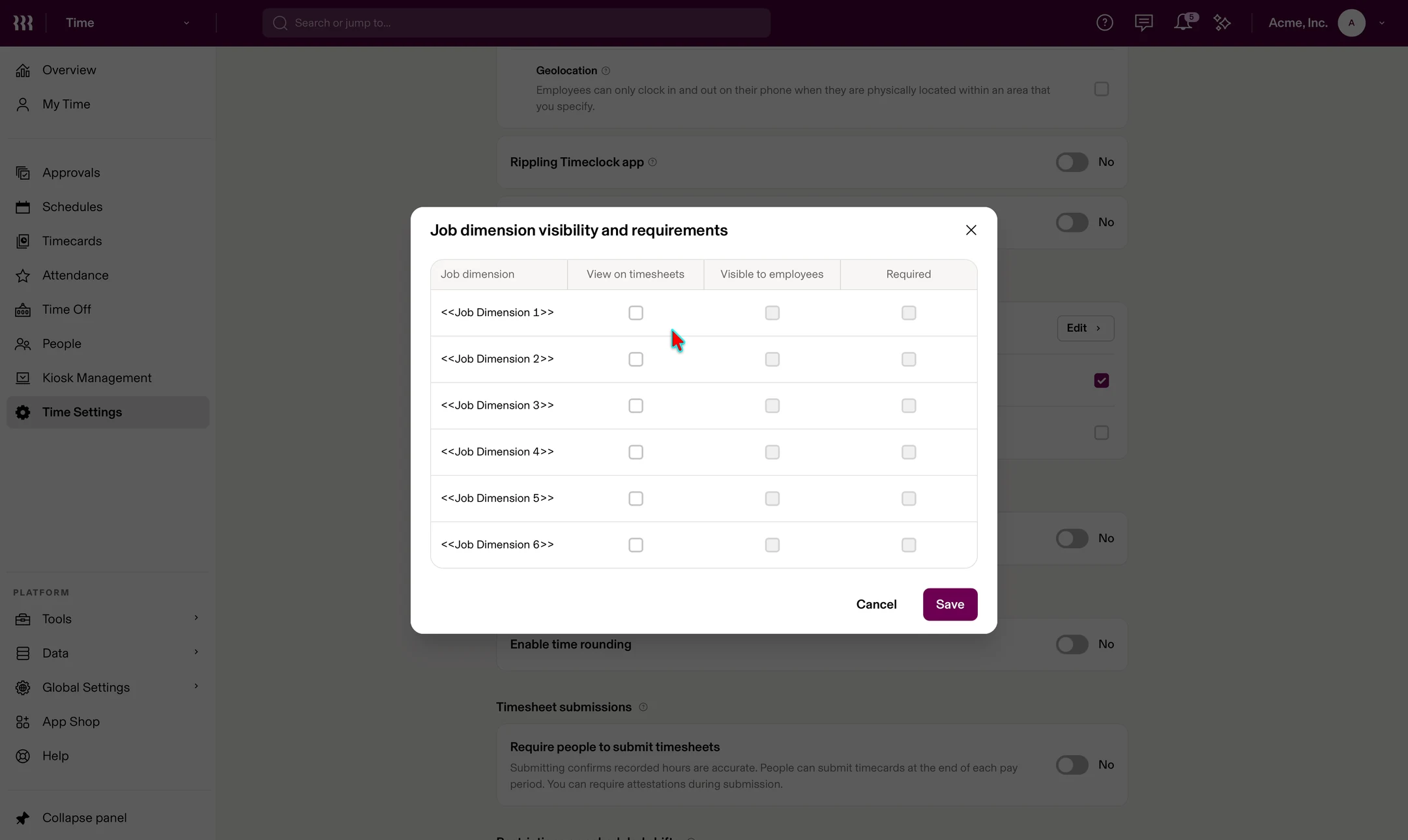
AfterFrom the Time Settings index into time tracking, one page, with options appearing as settings switch on FIG. NProgressive disclosure: each workday cutover method reveals only the field it needs - Time Settings3 feature tabs
Step 06.4 Defaults first
One default, with exceptions on top
A default applies to everyone; an exception changes only what differs for a group. The structure is the same at every tier: Lite admins learn the model, and Core adds exceptions on top.
FIG. ODefaults and exceptions, in Time & Attendance and Time OffThe behavior still differs between products; the mental model doesn’t Priority: Higher wins
Time & Attendance
- Exception, Core: Department = Customer Service, Highest priority
- Exception, Core: Department = Operations
- Default, Lite: Applies to everyone else, Clock-in methods, pay period, rounding
Time Off
- Exception, Core: Custom accrual, ranked, Copied from a default; highest rank wins
- Exception, Core: Country compliance policies, Rippling-provided minimums, by country
- Default, Lite: Leave types and simple accrual, e.g. 1 hr per 30 hrs worked
Same structure at every tier: Lite admins learn the model; Core adds exceptions on top
The key decision was not to build two products: one information architecture that starts simple and reveals depth, so nothing a Lite admin learns stops being true in Core
FIG. PDefaults and exceptions in the interface: Time & Attendance’s time tracking settings, empty and then configured 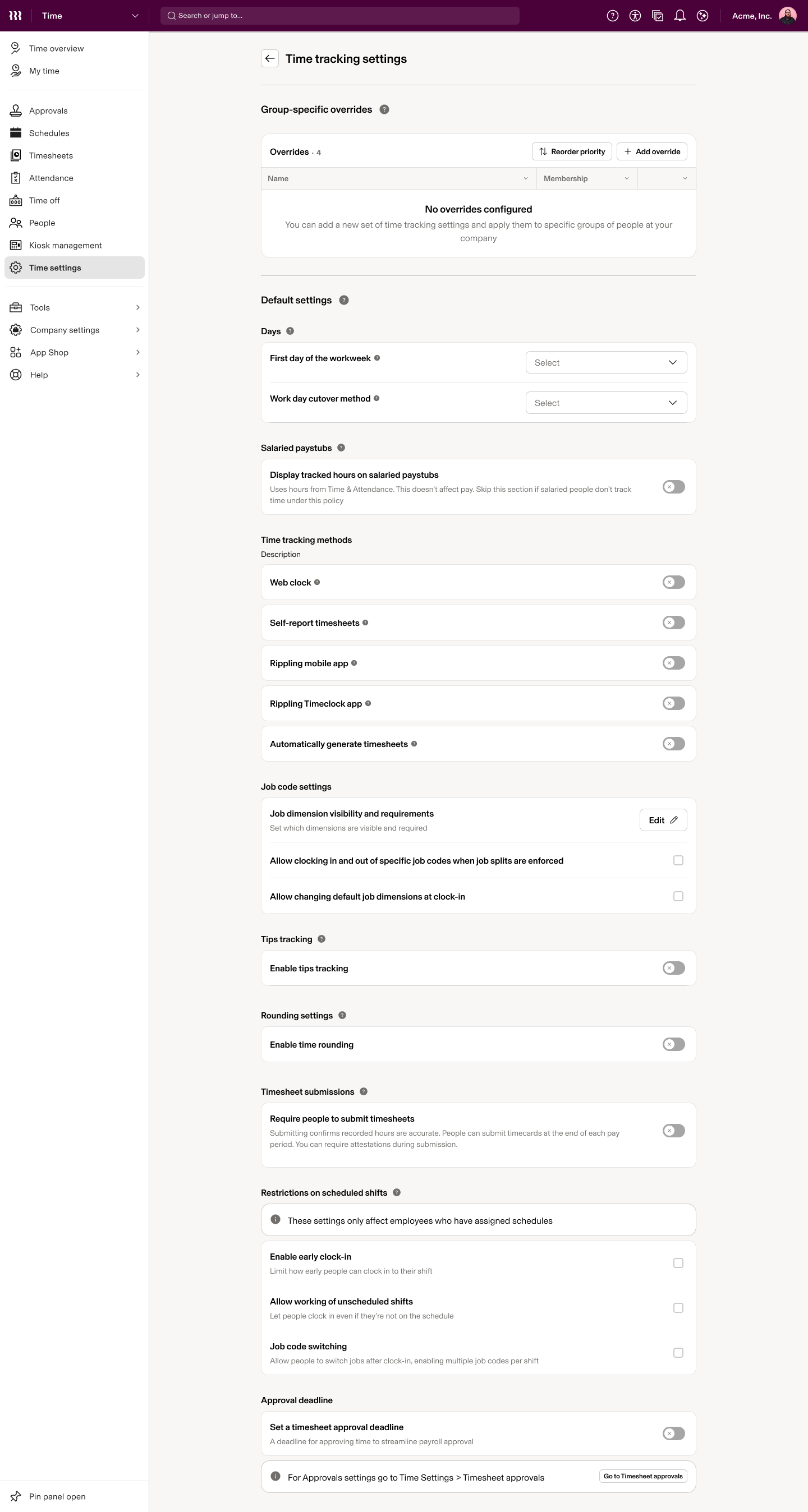
AfterCore, before any setup: an empty table of group-specific overrides above default settings still switched off
Showing image 01 / 02
Step 06.5 The limit
When the simple model stopped being simple
Established customers already carried legitimate complexity, and for many there was no obvious default. In 2026 I became design DRI for Time Settings V2, now in progress, to serve both.
FIG. QWhere a single default runs outNot a failure of defaults: the edge of the first model New customer
- DefaultMost of the team
- Exception: one group
An obvious default
Established customer
- Schedule: Warehouse
- Schedule: Stores
- Schedule: Office
- Group: Hourly
- Group: Salaried
- Location: CA
- Location: NY
- Approvals: By manager
- Default?
No single obvious default
07 Growing with the customer
Nobody should meet all of Rippling on day one
I helped define what belonged in Time Lite, what belonged at deeper tiers, and how upgrades could expose more capability without changing the model a customer had already learned
- Time Lite: Simple entry
- Basic scheduling
- Simple time tracking
- Straightforward time off
- Defaults
- Simple approvals
- Invite employees
- No Payroll required
- As needs growMore Time capability: When needs grow
- Exceptions
- Compliance
- Overtime rules
- Advanced leave
- Job structures
- Permissions
- Broader Rippling (potential): Other platform products
- HRIS
- Payroll
- More
Same model throughout
08 Timesheets
Reviewing time had outgrown Timecards
Timesheets, formerly Timecards, ran on interaction patterns more than six years old. The problem wasn’t polish: managers needed to review quickly, understand what happened, edit only when necessary and approve with confidence.
Step 08.1 Starting point
Built for a younger Rippling
Review, editing, saving, approval, navigation and dense pay-period data all carried patterns from Timecards’ early years
FIG. STimecards before the redesign: the list, a timecard, an entry modal, and a dialog stacked on it 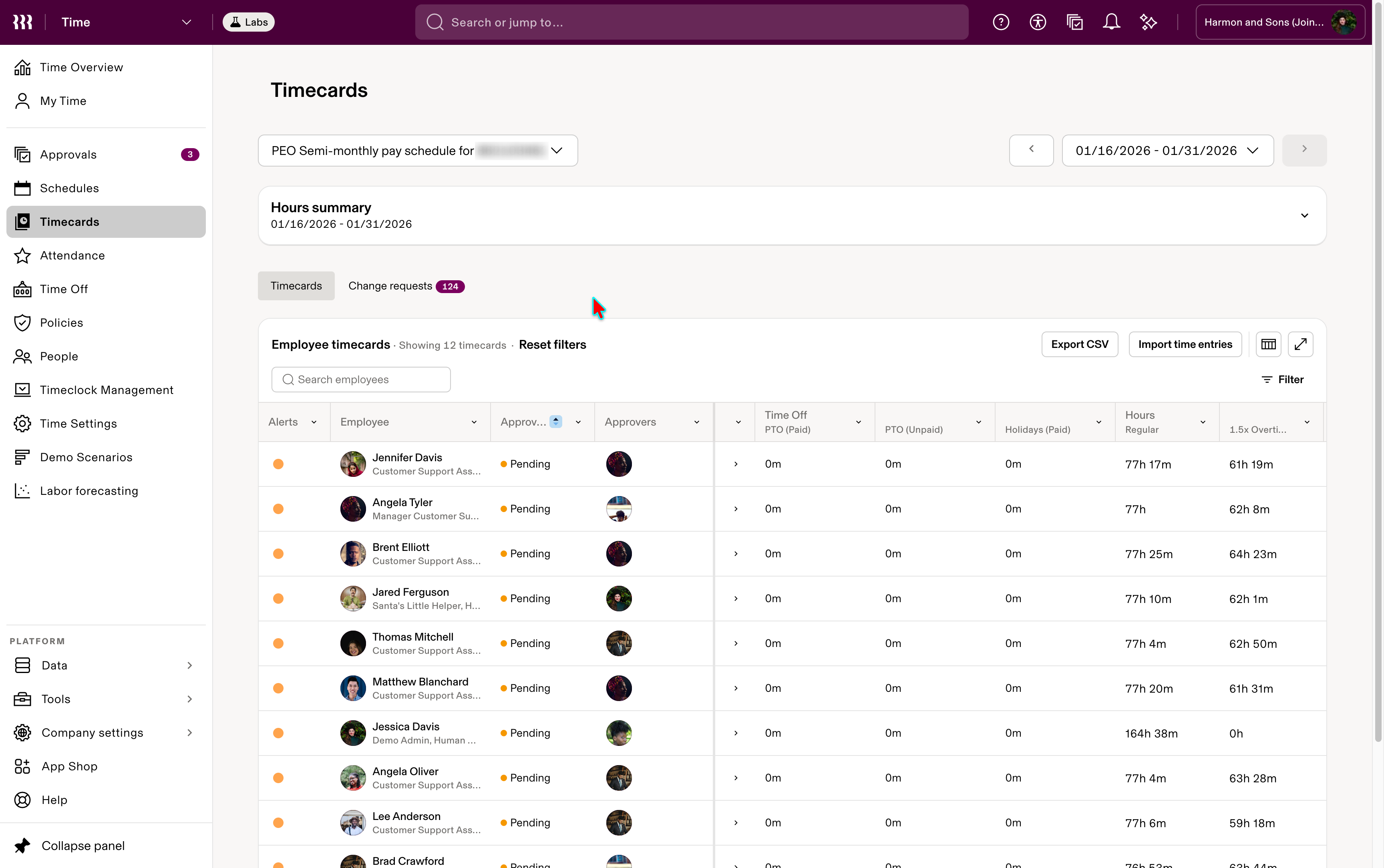
BeforeTimecards: every employee’s pay period, approval status and hours in one table
Showing image 01 / 04
FIG. TWhat a manager actually has to doEdit only when necessary; approve with confidence - ScanWhose time needs a look?
- UnderstandWhat’s off, and why?
- InvestigateOpen the day or the entry
- Edit if neededOnly when something’s wrong
- ApproveWith confidence
Step 08.2 Three levels
One workflow, three levels of detail
Worked hours alone aren’t enough to approve: a manager may need scheduled against actual time, leave, holidays, adjustments, exceptions, approval status and the entries behind a total
FIG. UOverview, investigation, recordThree layers of one web system, not three features - OverviewTimesheets Home
“What needs my attention?”
Holds- Every employee’s pay period
- Hours and approval status
- Exceptions, counted
One late clock-inOne employee, Sep 1–152 exceptions · PendingDone here:- Scan
- Investigation + editingTimesheet Editor
“What happened during this pay period?”
Holds- Each day, scheduled against worked
- Leave, holidays, adjustments
- Exceptions, on the day
Tue, Sep 2Scheduled 8:00 · in at 8:17 · lateDone here:- Understand
- Edit inline
- Approve
- Record + actionsTime Entry Details
“What happened in this record?”
Holds- Jobs, breaks, shift inputs
- Overtime and premiums
- Change requests, comments
8:17 AM – 4:30 PMLate clock-in alertDone here:- Investigate
- Edit the record
Corrections, totals and statuses roll back upMore detail, only when neededFIG. VTimesheets, from overview to record 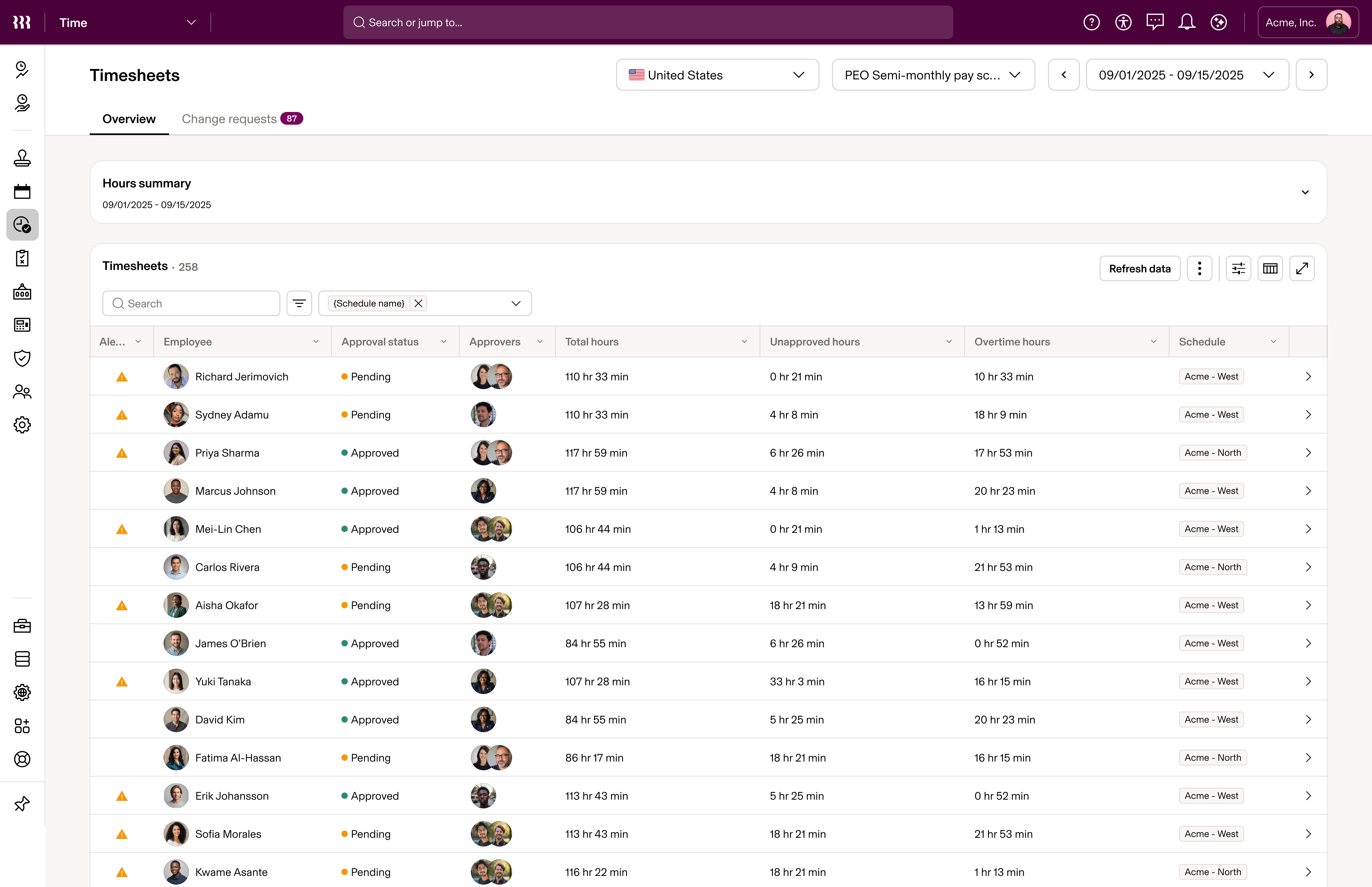
AfterTimesheets Home: what needs attention, by employee and pay period
Showing image 01 / 03
FIG. WEditor prototype: a break and a job edited from their chips, the same entry in Time Entry Details, then a new day’s times and job entered inline 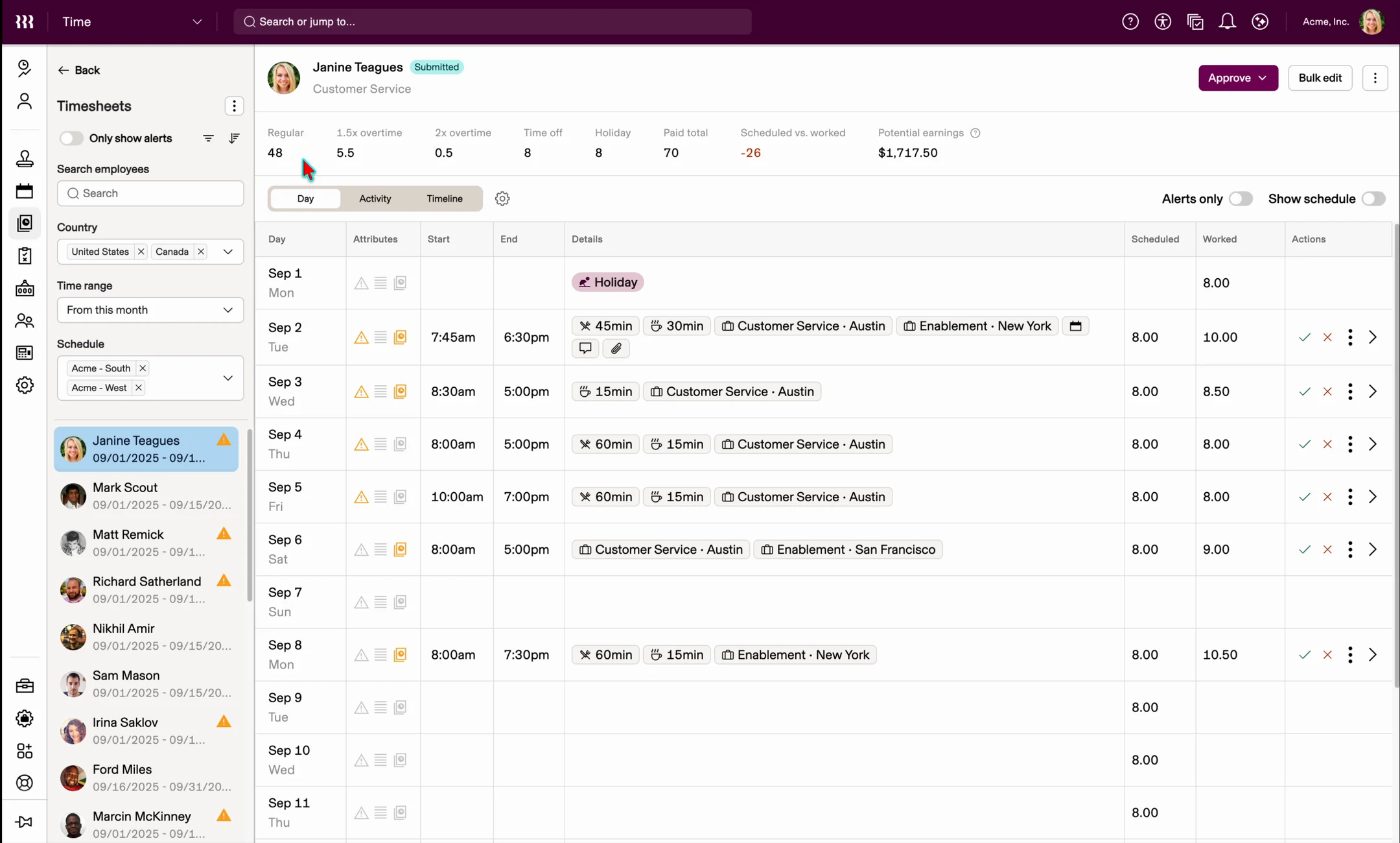
Editor prototype: a break and a job edited from their chips, the same entry in Time Entry Details, then a new day’s times and job entered inline Step 08.3 Still evolving
Live for everyone, and still evolving
On September 22, 2026, Timesheets went live for every customer and legacy Timecards was retired
300k+Daily usersAcross the broader Time customer base, not only standalone customers: every customer moved from Timecards by September 22, 2026, with 3.3M+ monthly page views shifting over
Moving every customer off a product they used several times a day took the team 544 PRs across frontend and backend, and the rollout drew 114 support tickets, 95% of them closed. The work continues: real usage keeps exposing better ways to filter, act, edit and read dense data.
One example is quick-editing a time entry’s attributes in the editor. Engineering’s first version used the design system’s standard grid pattern, and customers complained: narrow the Details column and the chips for jobs, breaks and shift inputs disappeared, with nothing to say they were there. I redesigned the interaction so a hover reveals the actions to add a job, a break or a shift input, and a narrowed column folds its chips into a +N count instead of hiding them.
FIG. XOne interaction, before and after: editing a time entry’s attributes in the Details column BeforeThe first implementation, a standard grid pattern. Narrow the Details column and its chips vanish with no sign they exist 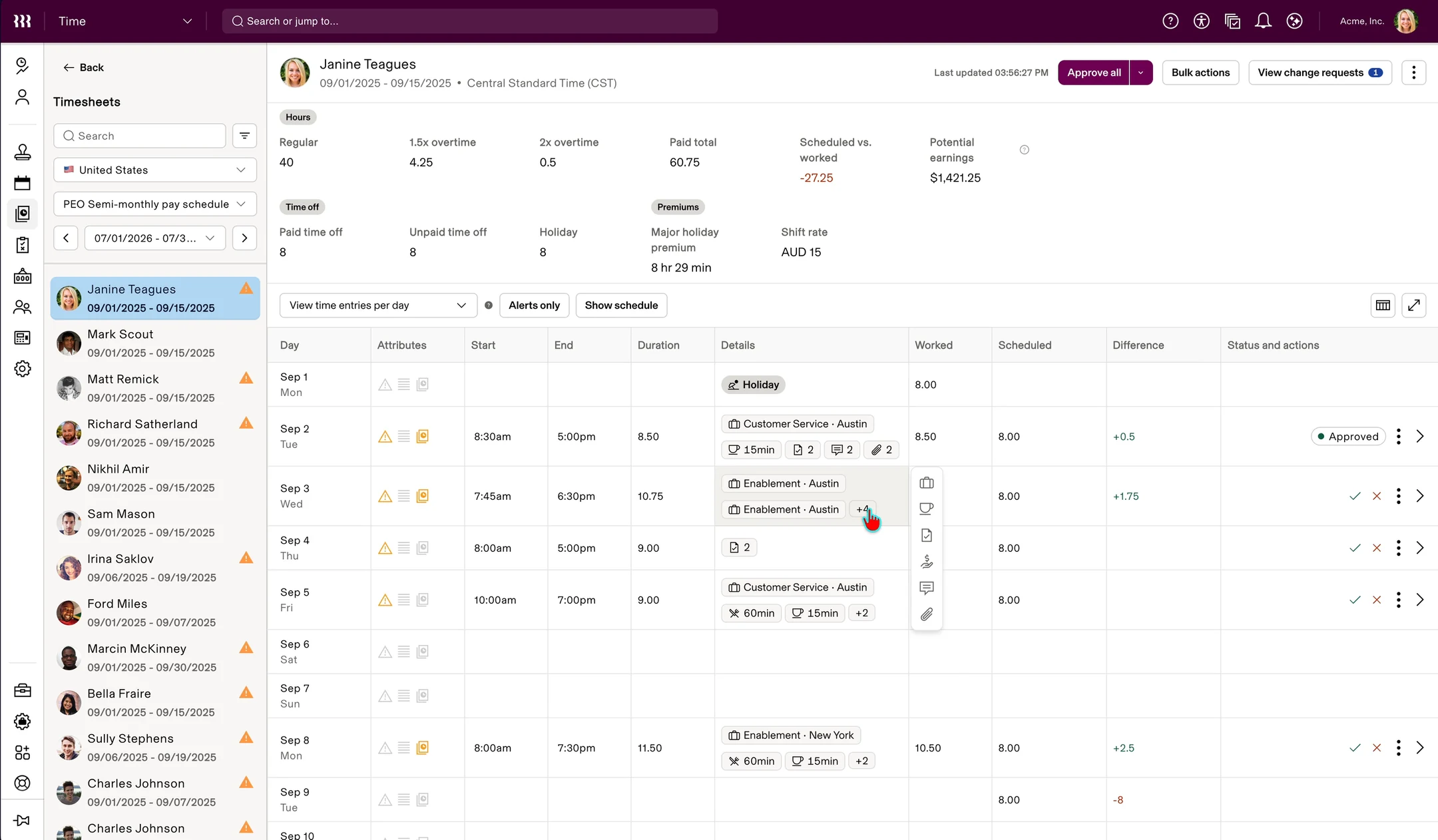
AfterA hover reveals actions to add jobs, breaks and shift inputs, and a narrow column folds its chips into +N Step 08.4 Web and mobile
One domain, two surfaces, two teams
Alongside the web Timesheets work, not after it, I redesigned mobile Time Entry Details and Shift Details with a separate mobile PM and engineering team. Both have shipped.
FIG. YWeb and mobile work, running in parallel Same period, in parallelWeb workstreamPM · engineering - Timesheets Home
- Timesheet Editor
- Time Entry Details
Decisions, specsQuestions, edge cases foundDesign, across both teamsShared product context - Interaction model
- Product behavior
- Time Settings rules
- Edge cases
- Shared terminology
- Cross-platform consistency
Decisions, specsQuestions, edge cases foundMobile workstreamPM · 2 engineers - Shift Details
- Time Entry Details
One domain model: time entries, shifts, approvals
Mobile was central to the standalone experience. In a January 14, 2026 update, mobile accounted for 87% of early Project Lake sessions. The initial standalone delivery still fell short for employees and managers tracking and approving time on the job. I redesigned Shift Details and Time Entry Details to address those gaps, carrying the shared rules and terminology into mobile-specific interactions.
This wasn’t making the desktop responsive. The mobile app had its own legacy patterns, so I adapted concepts rather than layouts: what each mobile view needed, and what a time entry meant on both surfaces.
FIG. ZThe mobile app before the redesign: the T&A home and the time entry it opened 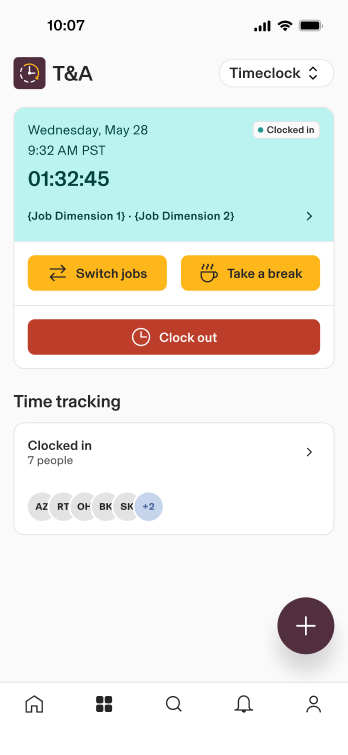
BeforeThe T&A home, a clocked-in card with Switch jobs, Take a break and Clock out 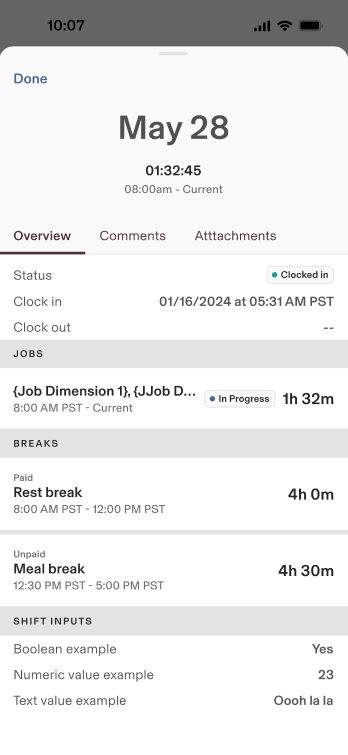
BeforeOne time entry as a sheet of tabs and label-value rows for status, jobs, breaks and shift inputs FIG. AAMobile Shift Details and Time Entry Details, redesigned: requests, overnight and repeating shifts, alerts, premiums and change requests 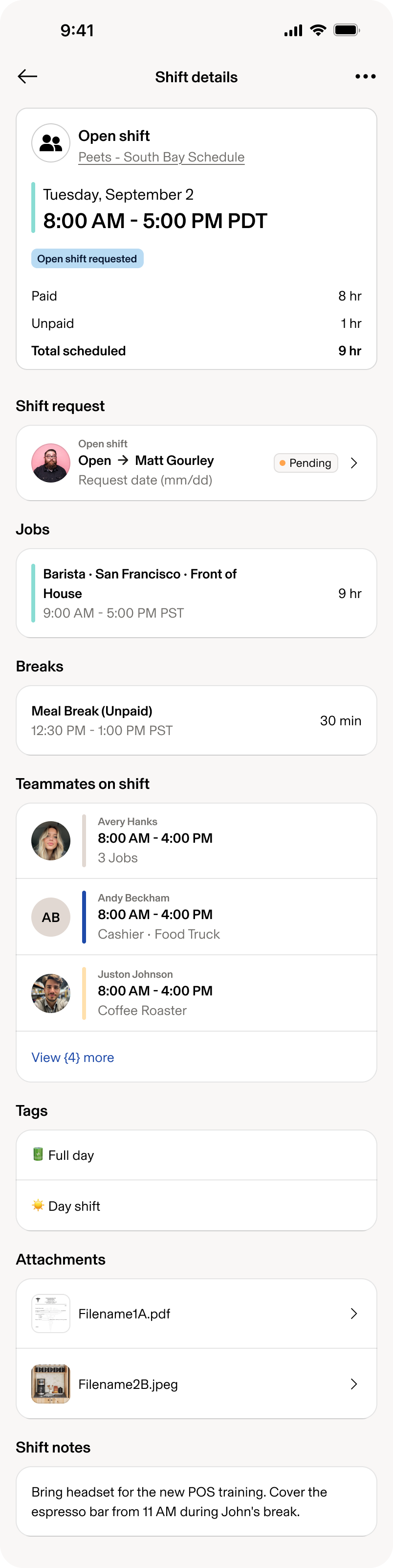
AfterShift Details: an open shift someone has asked to take 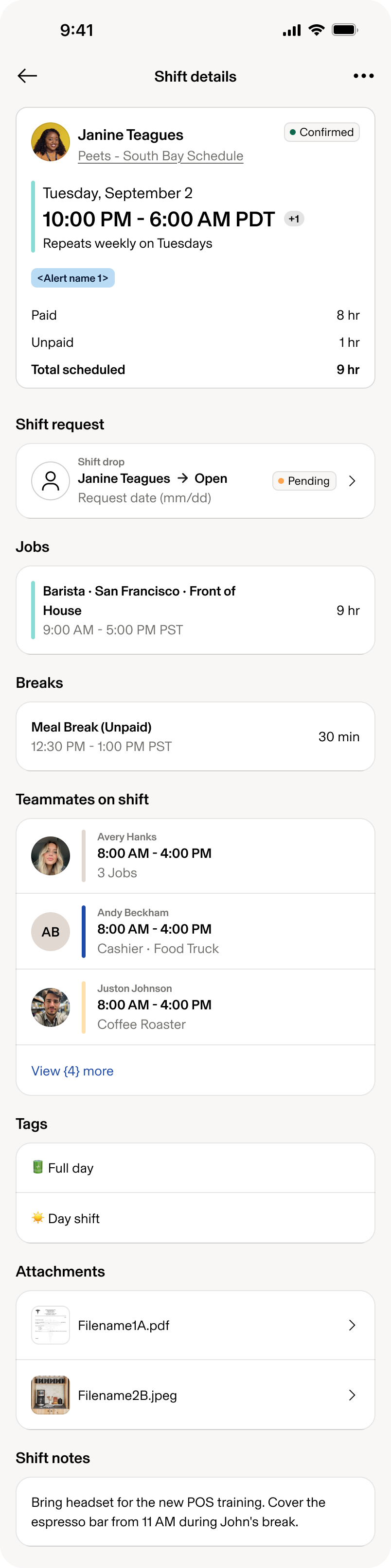
AfterShift Details: an overnight, weekly shift with a drop request 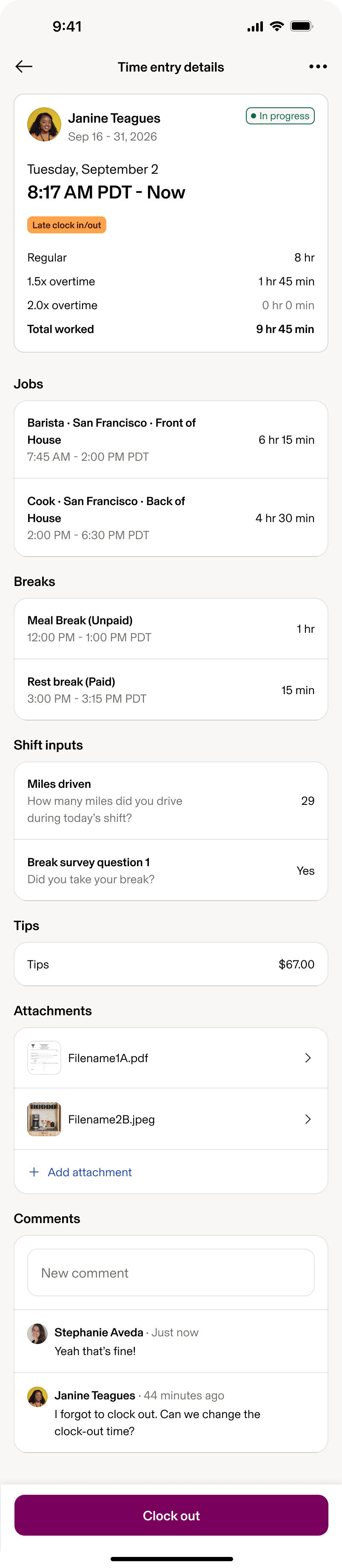

AfterTime Entry Details: in progress, with a late clock-in 
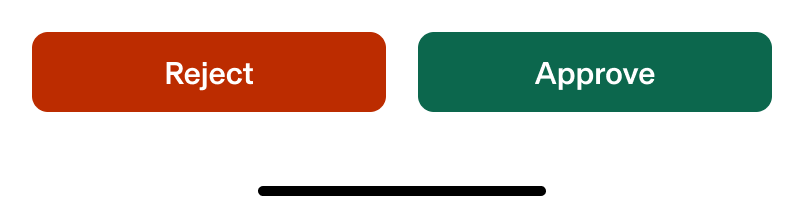
AfterTime Entry Details: pending approval, with a change request FIG. ABIn production on a phone: a clocked-in shift's details, then the team's timesheets, and one time entry split across two jobs, saved and approved 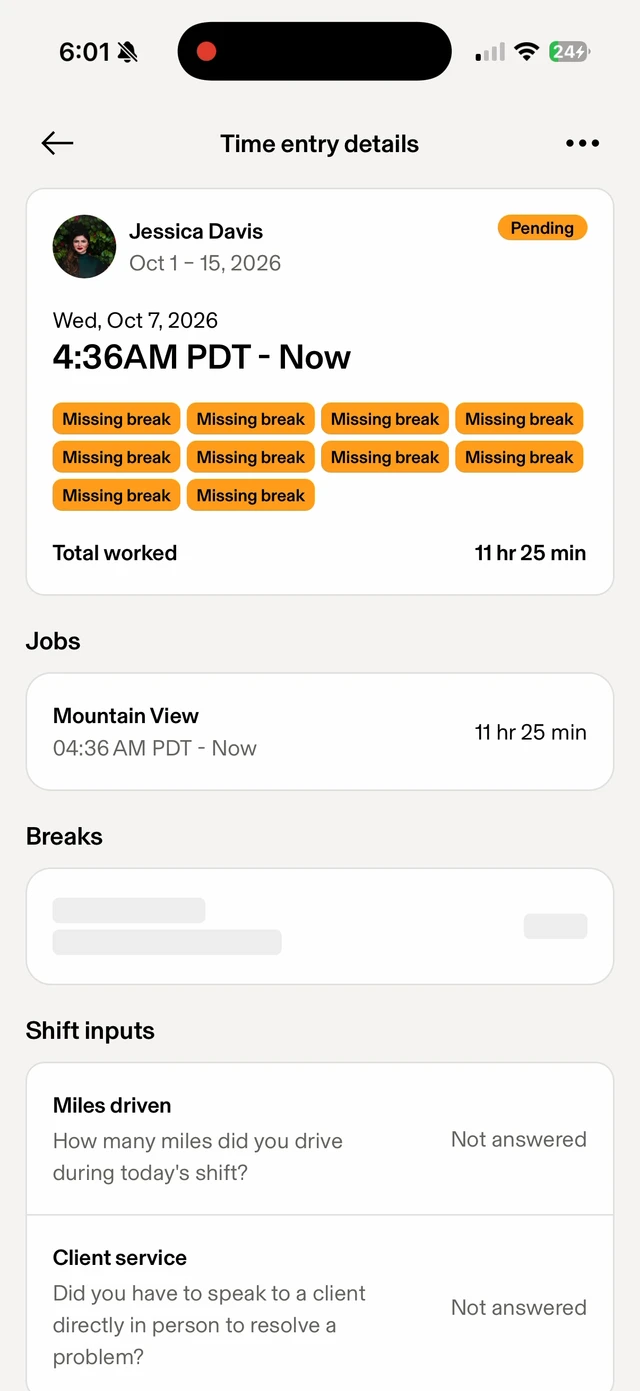
In production on a phone: a clocked-in shift's details, then the team's timesheets, and one time entry split across two jobs, saved and approved FIG. ACWhat each role can do to a time entry at each status Step 08.5 Into production
I followed the drawer into production
Under timeline and frontend-capacity constraints, the first build of the web Time Entry Details drawer diverged materially from its design
FIG. ADThe drawer as designed, then an early build in June, and the same layout in production in August 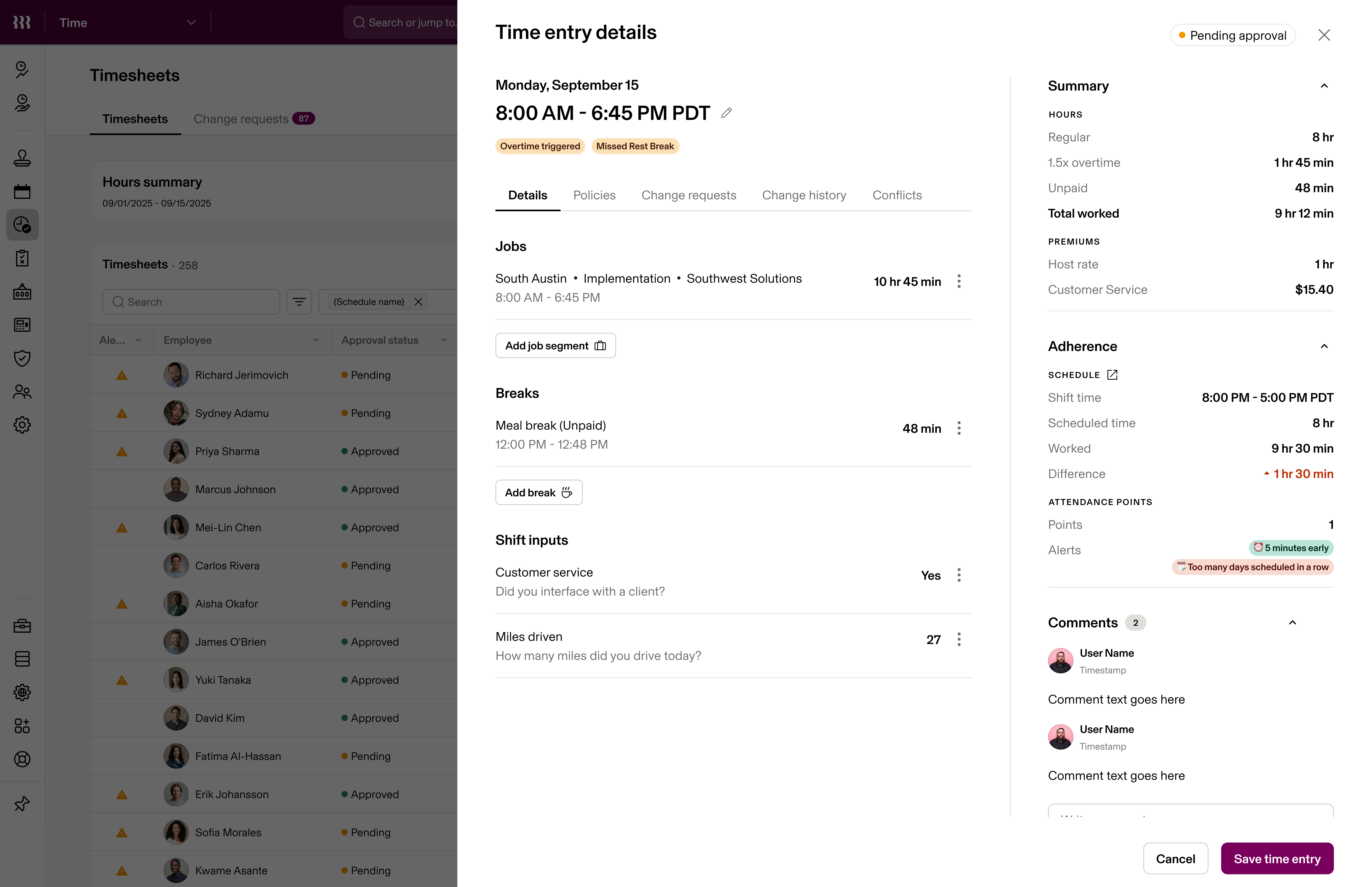
As designed
Showing image 01 / 03
FIG. AEIn production after my frontend work: jobs, breaks, times and shift inputs edited inside the drawer 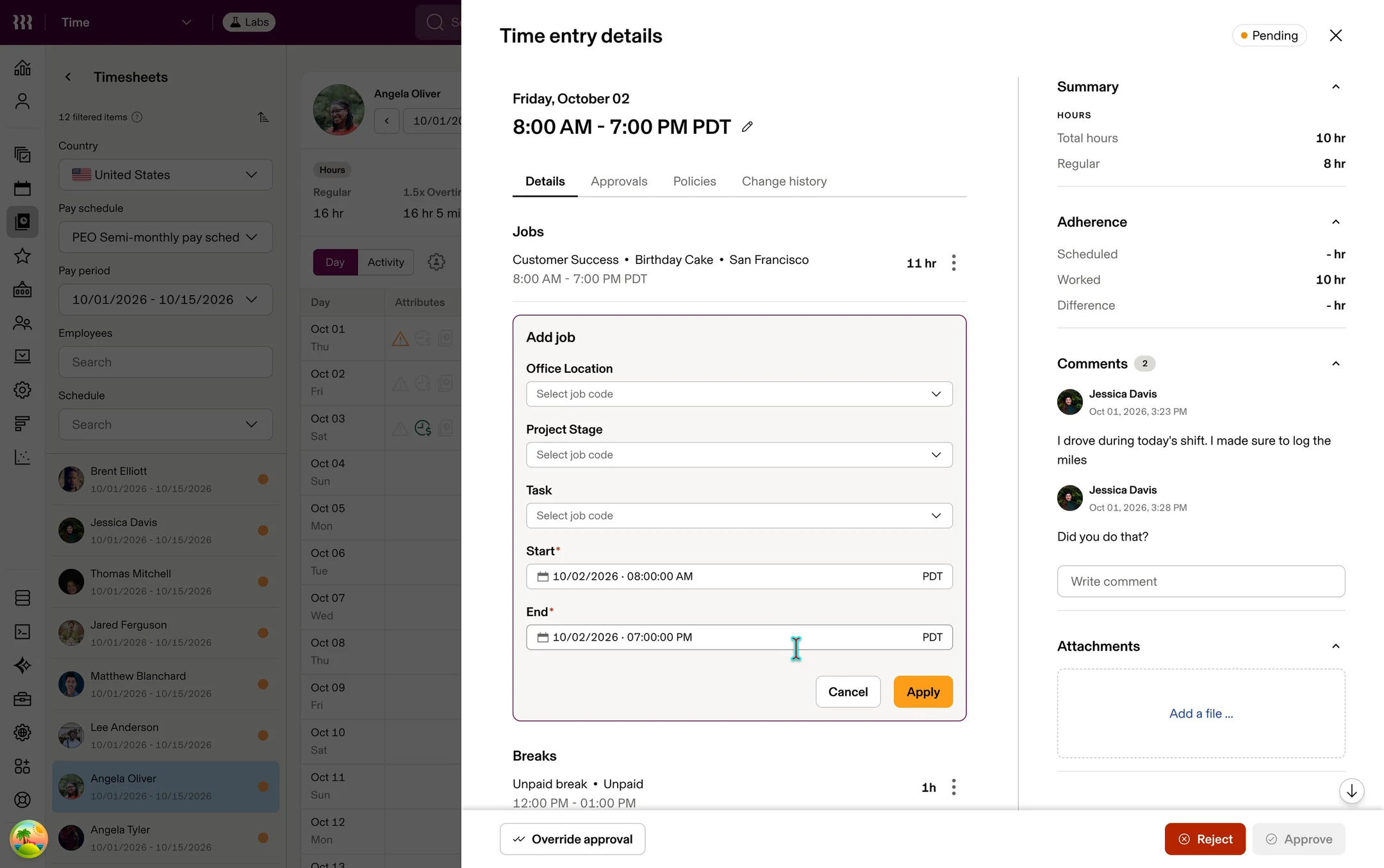
In production after my frontend work: jobs, breaks, times and shift inputs edited inside the drawer 12PRs authoredIn the production frontend, with Cursor, on web Time Entry Details and its supporting states, of the 544 the Timesheets rollout took
Working in the codebase surfaced states, dependencies and interaction cases the design hadn’t anticipated, so the design kept moving during implementation. This is one layer of Timesheets, not all of it.
FIG. AFInitial production PR for the Time Entry Details frontend, later split into smaller reviewable PRs OpenTime entry details UI cleanupFrom the PR description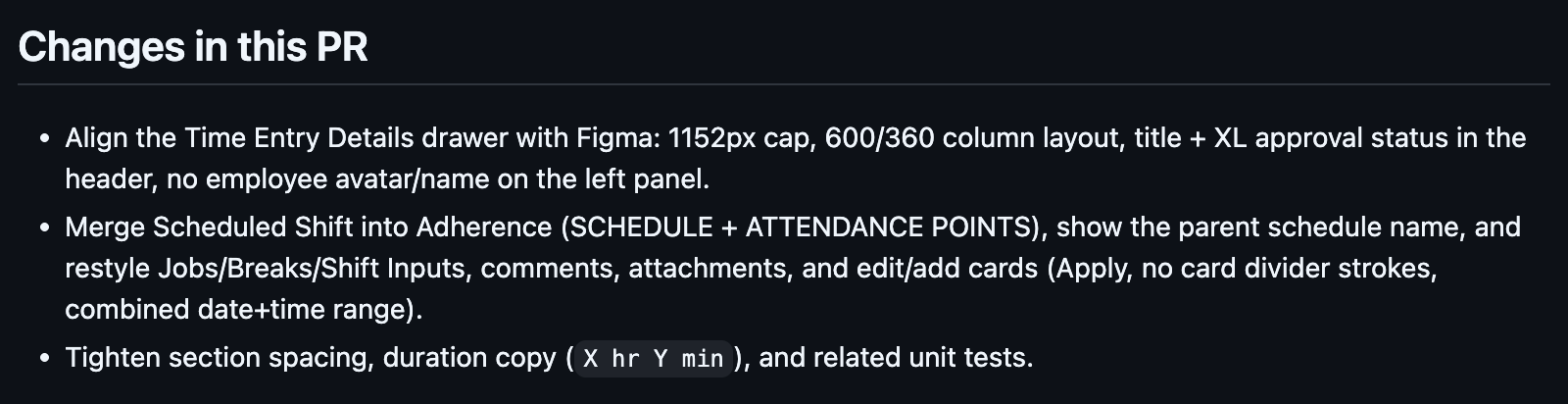
- Opened as one PR
- Split into smaller PRs for review
- Shipped in production
Step 08.6 Review to explanation
The next problem wasn’t what happened. It was why.
AI that explains the system’s results inside Timesheets, beginning to roll out
“How was my overtime calculated?” “Why did this missed break trigger premium pay?” Questions like these are hard for managers to answer and add to the support burden. The explanations bring patterns from the Time AI Copilot work into a production workflow.
FIG. AGExplain with AI, in development: the policy rules and a daily breakdown behind an overtime total 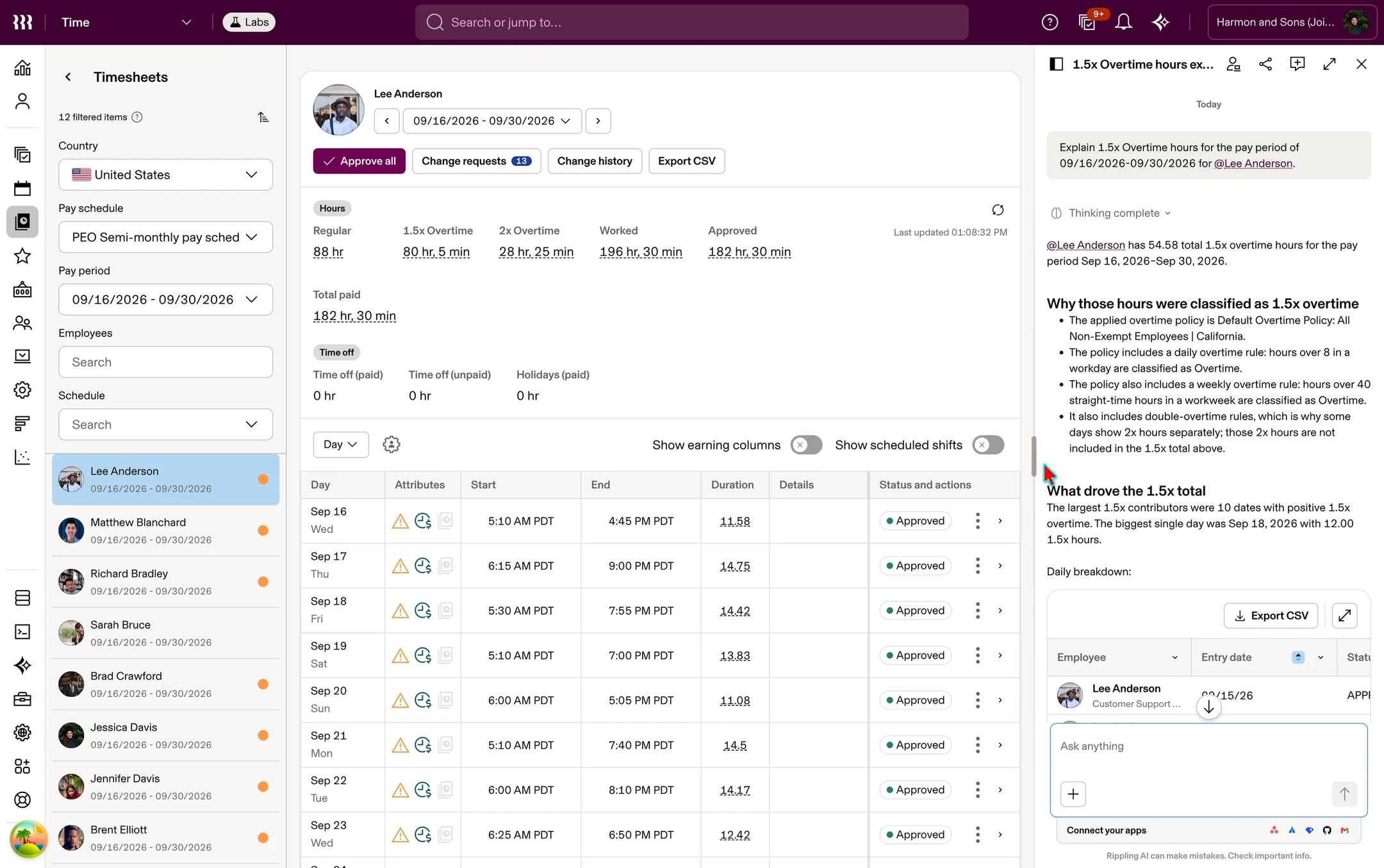
Explain with AI, in development: the policy rules and a daily breakdown behind an overtime total
09 Outcomes
Time became a new way into Rippling
Program-level results, shared across the team
A broader cross-sell opportunity taking shape
By October 2026, the broader When I Work cross-sell initiative was estimated to have added approximately $10M in ARR. My contribution focused on the configuration and time-review experiences that made Time work as a first Rippling product.
Time Standalone went live
Customers can start with Time, without first buying Payroll
When I Work customers began migrating
The first When I Work migrations were reported in December 2025. By the October 7, 2026 report, 2,955 companies had reached cutover. Migration progress and sustained product usage remained separate challenges.
A foundation for configuration
The defaults + exceptions model became the base for Time Settings V2
Timesheets, live for everyone
Every customer moved to Timesheets on September 22, 2026 and Timecards was retired; across the broader Time customer base, it serves 300k+ daily users
Mobile details shipped
I redesigned mobile Shift Details and Time Entry Details with a separate mobile PM and engineering team, addressing gaps in the standalone experience for employees and managers working on the job. Both have shipped.
From exploration to product
Explanation patterns from Time AI Copilot are beginning to roll out inside Timesheets
2,955WIW companies cut overOf 3,258 companies in the October 7, 2026 migration report.
2,581Companies with login activityWithin the same 3,258-company reporting cohort, October 7, 2026.
What I learned
- Simplification wasn’t removing controls; it was deciding what a customer needed to understand now, what the system could safely handle underneath, and how the model should behave when the easy case stopped being easy
- The work kept crossing boundaries: platform architecture, Settings, Timesheets, web, mobile, and eventually production code
We’ve just crossed the $1.5M ARR mark in WIW cross sell, with a lot more to come in Feb. The pilot can help us accelerate that, and get to our $20M target this year - a big thank you to the Product & Design team for their incredible effort